

Skip Project Types
The Skip Getting Started guide demonstrates using skip create to generate a basic app project interactively, but there are a variety of additional project types that can be created using the skip init command. This document discussed the various different project types that can be created and built with Skip.
- Creating an App with
skip init - Creating a Dual-Platform Framework
- Migrating an Existing App to Skip
- Updating Skip
- Additional Resources
Creating an App with skip init
The skip init command is an alternative to the interactive skip create command, which facilitates the initialization of an app with a single, non-interactive command. Run skip init --help or see the the command line reference for a complete listing of skip init options.
Creating a Dual-Platform App
Create a new dual-platform app project with the command:
skip init --transpiled-app --appid=bundle.id project-name AppName
Passing --native-app creates a Skip Fuse app, and --transpiled-app will create a Skip Lite app.
Your appid must contain at least two words, and each word must be separated by a .. It is conventional to use reverse-DNS naming, such as com.companyname.AppName. Also make sure that your project-name and AppName are different. It is conventional to use a lowercase, hyphenated name for your project (which Skip uses to create your app’s main SwiftPM package name), and UpperCamelCase for your app name.
Pass the --open-xcode argument to immediately open the project in Xcode. For example:
skip init --open-xcode --transpiled-app --appid=bundle.id.HelloSkip hello-skip HelloSkip
This will create a hello-skip/ folder with a new SwiftPM package containing a single module named HelloSkip, along with folders named Darwin and Android and the shared Skip.env app configuration file. The Darwin folder will contain a HelloSkip.xcodeproj project with a HelloSkip target, which you can open in Xcode.
See the command line reference for a complete listing of skip init options.
skip create and skip init will create a functional template app, but before you can build and launch it, an Android emulator needs to be running. You can set up an emulator by running
skip android emulator create and then skip android emulator launch, as described in
the command line reference.
Alternatively, you can install and launch Android Studio.app,
and then open the Device Manager from the ellipsis menu of the Welcome dialog
to create an emulator of your choice.
You can then use the Device Manager to launch the emulator, or you can run it from the terminal with a command like ~/Library/Android/sdk/emulator/emulator @Pixel_6_API_33.
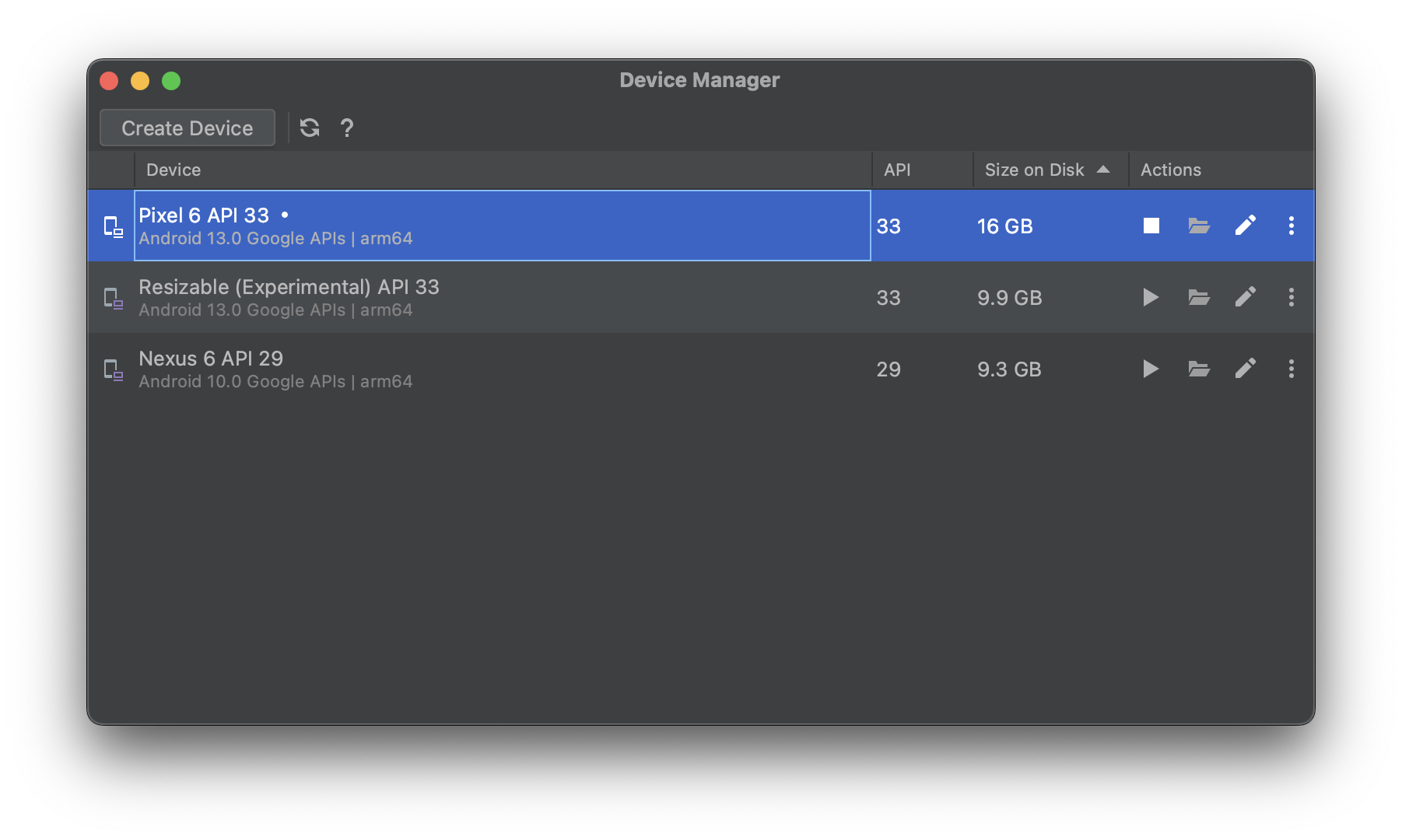
Once the Android emulator is running, select and run the HelloSkip target in Xcode. The first build will take some time to compile the Skip libraries, and you may be prompted with a dialog to affirm that you trust the Skip plugin. Once the build and run action completes, the SwiftUI app will open in the selected iOS simulator, and at the same time the Android app will launch in the currently-running Android emulator.
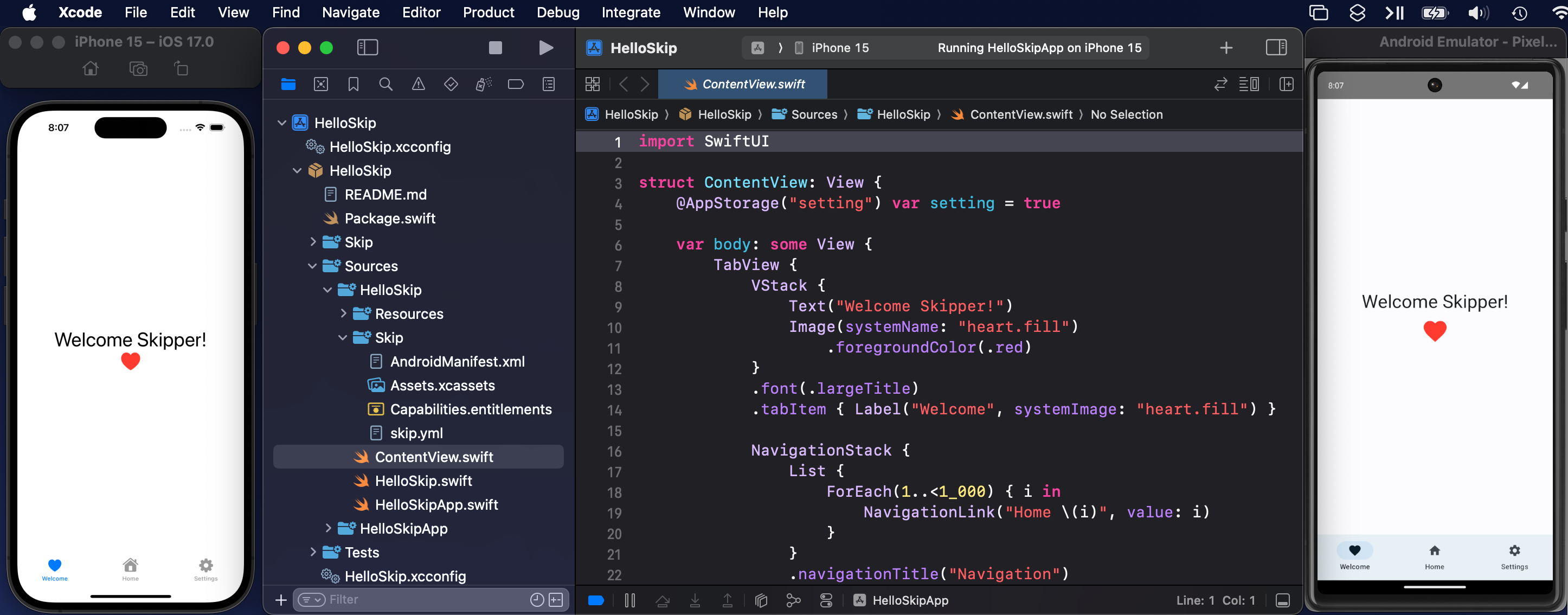
Browse to the ContentView.swift file and make a small change and re-run the target: the app will be re-built and re-run on both platforms simultaneously with your changes.
You’re now ready to continue working on your first Skip app! For more information - including common issues and workarounds - see the Development chapter. Consider browsing our other documentation as well. Happy Skipping!
Creating a Multi-Module App
Skip is designed to accommodate and encourage using multi-module projects. You can create a modularized project by specifying additional module names to skip init at the end of the chain. For example:
skip init --transpiled-app --appid=bundle.id.HelloSkip multi-project HelloSkip HelloModel HelloCore
This command will create a SwiftPM project with three modules: HelloSkip, HelloModel, and HelloCore. The heuristics of such module creation is that the modules will all be dependent on their subsequent peer module, with the first module (HelloSkip) having an initial dependency on SkipFuseUI and the second module depending on SkipFuse and SkipModel. The Package.swift file can be manually edited to shuffle around dependencies, or to add new dependencies on additional frameworks.
Creating Separate iOS and Android Apps
You might choose to share functionality using dual-platform frameworks, but create separate iOS and Android apps. Some development teams, for example, would like to share common model and business logic layers, but write the UI separately for each platform.
The Travel Posters sample app provides an example of this pattern. You can read more about it in this blog post. It has the following top-level entries:
travel-posters-model: This SwiftPM package builds a dual-platform framework containing a common model layer for the iOS and Android apps. Skip ensures that the@Observabletypes you write in Swift can power not only a SwiftUI interface, but a Compose interface as well. See the Development documentation for details.iOS: Directory containing the TravelPosters iOS app and Xcode project, which hastravel-posters-modelas a package dependency.Android: Directory containing the Android version of the app. TheAndroid/libdirectory contains exported archives oftravel-posters-modeland the various Skip frameworks that it depends on.TravelPostersNative.xcworkspace: A workspace that includes both the iOS app and thetravel-posters-modelpackage.
Use TravelPostersNative.xcworkspace to iterate on the iOS app and/or shared model layer. To donate the latest travel-posters-model code to the Android app:
skip export --project travel-posters-model -d Android/lib/debug/ --debug
skip export --project travel-posters-model -d Android/lib/release/ --release
There are many ways to automate this process, from simple scripting to git submodules to publishing Skip’s generated Android travel-posters-model output to a local Maven repository. Use whatever system fits your team’s workflow best.
See the Deployment chapter for more information on skip export.
Additional notes:
- You may need to “Sync Project with Gradle Files” in Android Studio after updating the exported libraries.
- Using an exported library function which has transitive dependencies on additional Android libraries can cause a runtime error. You must ensure that all transitive dependencies are in your own app’s
build.gradle.kts.
Creating a Dual-Platform Framework
SkipFuse apps can depend on pure SwiftPM packages as well as pure Kotlin/Java Android libraries. See the chapter covering dependencies for details. This section describes how to create a Swift framework whose API can be used from both Swift and Kotlin. The most common use cases are powering SkipLite transpiled apps or separate iOS and Android apps.
Dual-platform Skip frameworks are pure SwiftPM packages that encapsulate common functionality. Frameworks are simpler than app projects, as they do not need Darwin/ and Android/ folders.
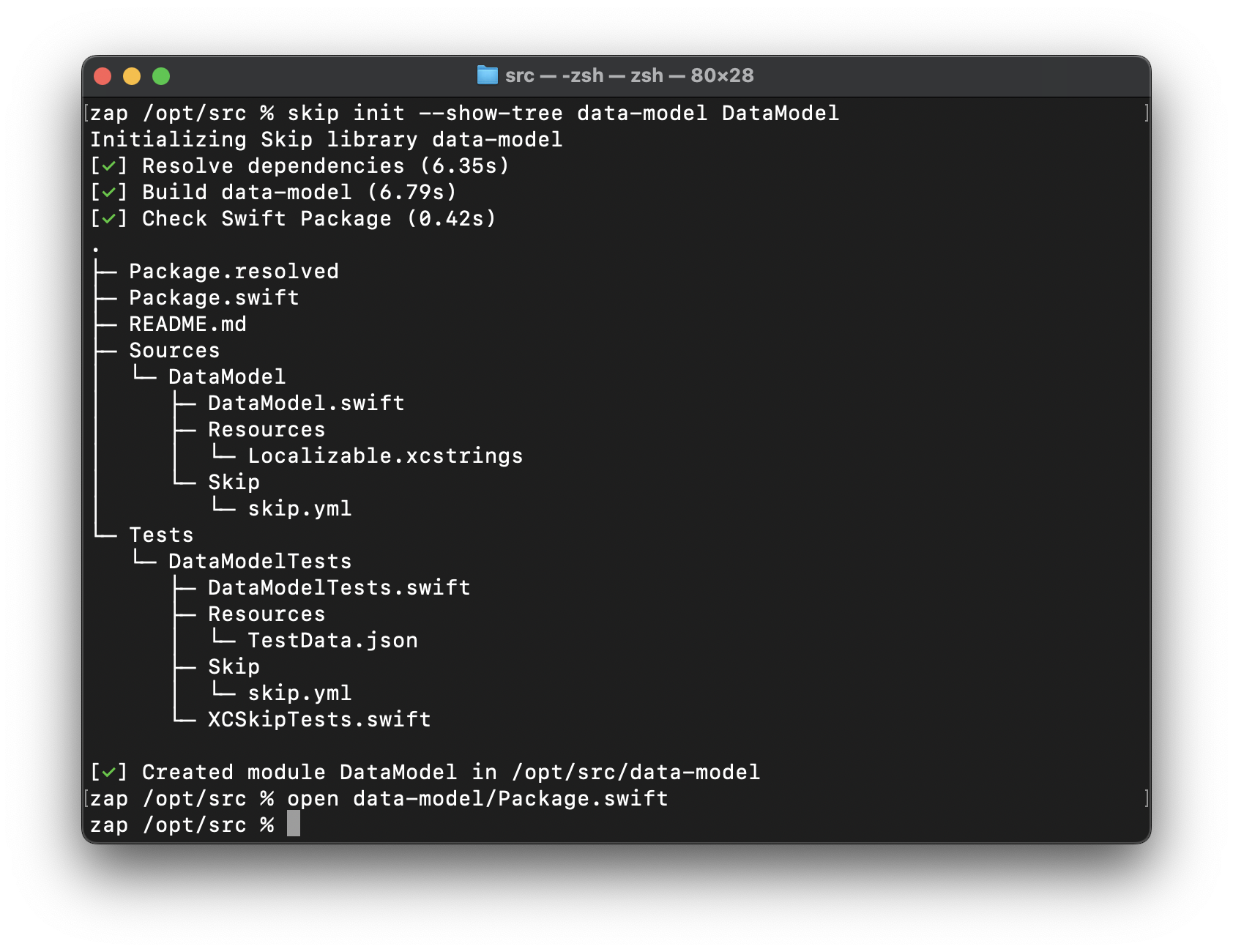
A new framework project can be generated with:
skip init --native-model lib-name ModuleName
This will create a new lib-name folder containing a Package.swift with targets of ModuleName and ModuleNameTests.
Passing --native-model creates a Skip Fuse compiled Swift package. Omit this flag to create a Skip Lite transpiled package instead. Skip frameworks like SkipLib and SkipFoundation are examples of transpiled packages, and they are rich sources of examples of various strategies for providing dual-platform functionality.
The generated package can be opened in Xcode, which you can use to build and run the unit tests. Or use swift build and swift test from the Terminal for headless testing as part of a continuous integration process.
Due to limitations on Xcode plugins, building your framework target only builds the iOS version. To build the Android version, you must run your unit tests. The Android build occurs as part of the testing process.
The --native-model option we passed to skip init will configure Skip to automatically bridge our model’s public API from compiled Swift to Android’s ART Java runtime. This is done through the skip.yml configuration file included in every Skip module. See the documentation on bridging and skip.yml for details.
Skip Framework Structure
The structure of a Skip framework is exactly the same as any other SwiftPM package:
lib-name
├── Package.resolved
├── Package.swift
├── README.md
├── Sources
│   └── ModuleName
│       ├── ModuleName.swift
│       ├── Resources
│       │   └── Localizable.xcstrings
│       └── Skip
│           └── skip.yml
└── Tests
    └── ModuleNameTests
        ├── ModuleNameTests.swift
        ├── Resources
        │   └── TestData.json
        ├── Skip
        │   └── skip.yml
        └── XCSkipTests.swift
Skip frameworks use a standard Package.swift file, with the exception of added dependencies on Skip libraries and use of the skipstone plugin for transpilation:
// swift-tools-version: 5.8
import PackageDescription

let package = Package(
    name: "lib-name",
    defaultLocalization: "en",
    platforms: [.iOS(.v16), .macOS(.v13), .tvOS(.v16), .watchOS(.v9), .macCatalyst(.v16)],
    products: [
        .library(name: "ModuleName", targets: ["ModuleName"]),
    ],
    dependencies: [
        .package(url: "https://source.skip.tools/skip.git", from: "1.5.0"),
        .package(url: "https://source.skip.tools/skip-fuse.git", from: "1.0.0"),
        .package(url: "https://source.skip.tools/skip-model.git", from: "1.0.0"),
    ],
    targets: [
        .target(name: "ModuleName", , dependencies: [
            .product(name: "SkipFuse", package: "skip-fuse")
            .product(name: "SkipModel", package: "skip-model")
        ], plugins: [
            .plugin(name: "skipstone", package: "skip")
        ]),
        .testTarget(name: "ModuleNameTests", dependencies: ["ModuleName"], plugins: [.plugin(name: "skipstone", package: "skip")]),
    ]
)
This configuration includes the dependencies you need to write common model code, including @Observables that will work with both SwiftUI and Compose user interfaces. You are free to edit Package.swift for your particular needs.
Migrating an Existing App to Skip
Migrating an existing app to Skip is not trivial. Most apps contain many iOS-only dependencies that make an Android port challenging.
Additionally, when you use skip create or skip init to create a new Skip app, it handles all the messy details involved in making an app that can build for both iOS and Android. The process is complex enough that we do not recommend trying to migrate an existing Xcode project. Instead, choose one of two options to create an Android version of your existing app:
- Use
skip createorskip initto create a new Skip app, then add your existing app’s dependencies and code. - Keep your existing Xcode app, and create a separate Android app using Android Studio or your IDE of choice. Manage the apps separately, but share code by creating dual-platform frameworks.
Regardless of which option you choose, your first steps are the same:
- Modularize your app into Swift Package Manager packages, if it isn’t already.
- Starting with your “base” module and working your way up the stack, attempt to get each module building for Android.
We recommend using Skip Fuse where possible, as it offers greater compatibility with existing Swift code and dependencies.
Porting an app to an entirely new platform isn’t easy, even with Skip. Remember that we’re here to help.
Updating Skip
To update the skip command line tool:
$ skip upgrade
To update your Xcode project to use the latest version of the Skip plugin and libraries allowed by your Package.swift configuration, use the File -> Packages -> Update to Latest Package Versions Xcode menu option.
Additional Resources
- Use
skip helpfor a complete list ofskiptool commands, and see the command line reference. - Check the general help page for troubleshooting and contact information.
- Continue browsing this documentation to learn more about developing with Skip.